Setting Up RobotPoses for AdvantageScope Simulation
Use this guide to make your subsystem RobotPose components move correctly in AdvantageScope simulation.
In SolidWorks
Measure each component pivot point relative to the SolidWorks origin and record those values.
In Code
Record each pivot measurement relative to the front of the robot in this order:
x= forward/backy= left/rightz= up/down
If you measured from a different CAD origin, convert to front-relative values first using your measured origin offset.
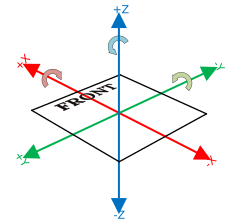
Rule of Thumb for Building Mechanism Poses
- Use
Pose3d.kZerowhen placing a mechanism pose relative to the robot origin. - For connected mechanisms (for example, a hood on a turret or an intake on an elevator), replace
Pose3d.kZerowith the parent mechanism's currentPose3d(for example, the turretPose3dfor a hood, or the elevatorPose3dfor an intake). - Use
.transformBy(...)for slides and translation-based motion (for example, elevators or sliding intakes). - Use
.rotateAround(...)for pivots and rotation-based motion (for example, turrets, hoods, or pivot intakes).
Warning
If a value looks flipped in simulation, verify sign (+ vs -) before changing anything else.
In AdvantageScope
- Grab the *PivotPoint objects from RobotPoses/ section in advantage scope and add to poses.
- Right click the object and set to axis (or cone if you can't see it well).
- Compare axis/cones locations to your expected mechanism pivot points.
- If axis/cones are incorrect, check:
- measurement correctness,
- coordinate order (
x,y,z), - sign (positive vs negative).
- Correct one axis at a time:
- If the cone/axis is mirrored front/back, flip the sign of
x. - If the cone/axis is mirrored left/right, flip the sign of
y. - If the cone/axis is mirrored up/down, flip the sign of
z. - If the cone/axis moves in a completely wrong direction, verify the axis order is still
x, theny, thenz.
- If the cone/axis is mirrored front/back, flip the sign of
- After cone placement is correct, test mechanism motion in simulation.
If the cone locations are wrong, the mechanism will not move correctly in simulation. Do not continue until cone placement looks correct.